Connect a nebolink to the bilge pump
Wire the nebolink's blue wire between the float switch and the bilge pump, so you can get high water alerts.
The nebolink's blue wire senses when the bilge pump runs. Once it's connected, the dashboard can alert you every time the pump runs, or when it runs more often than it should.
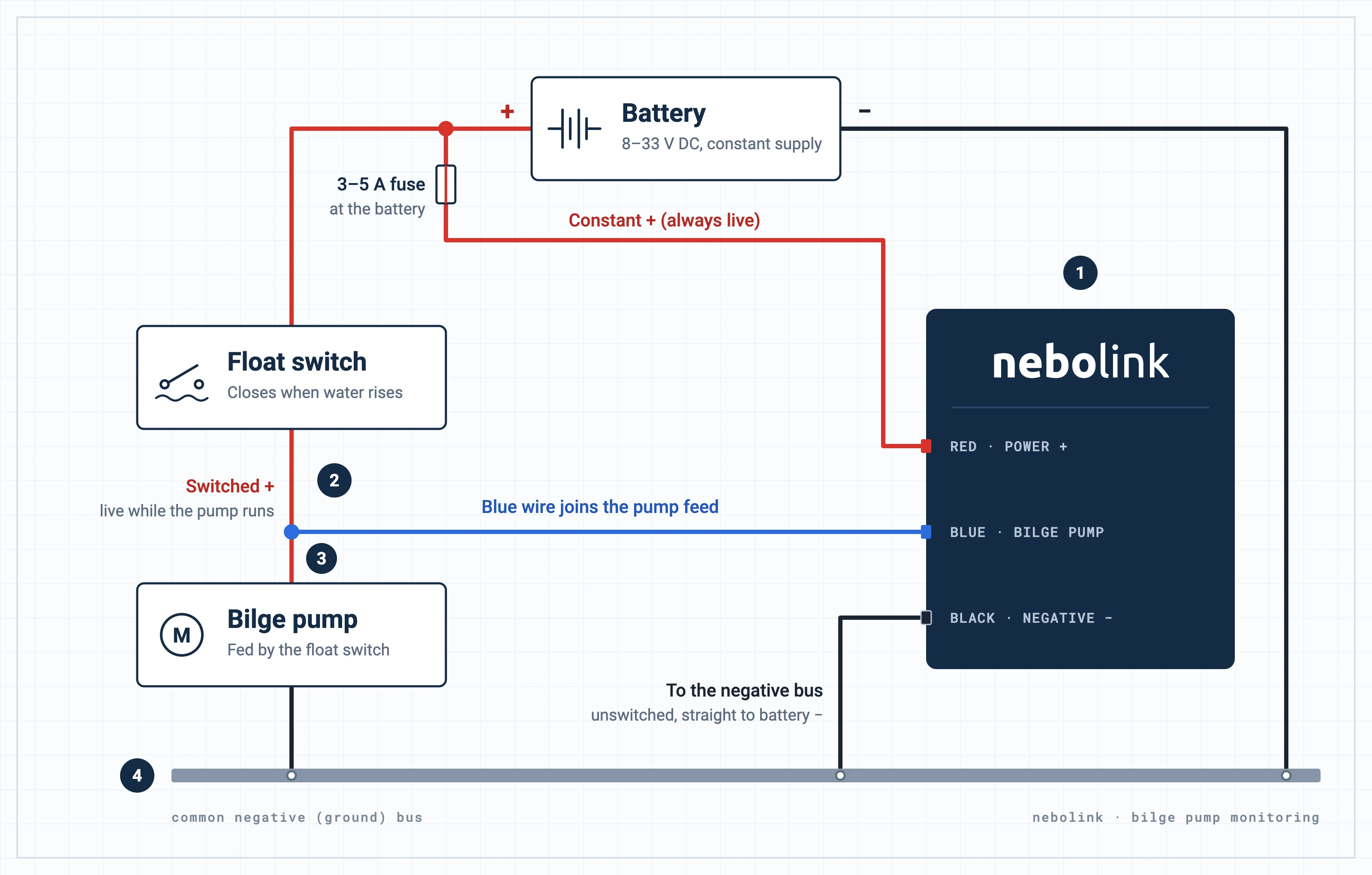
The numbers on the diagram match steps 1 to 4 below. Click or tap the diagram to open it full size.
- 1
Connect the nebolink to constant power
The nebolink needs a constant DC supply between 8 and 33 volts that stays live when the boat is switched off:
- Connect the red wire to positive (+), through a 3–5 A inline fuse as close to the battery as possible, on the battery side of any isolation switch.
- Connect the black wire to negative (−), at the common negative bus: one wired straight to the battery's negative, not behind an isolation switch.
The inline fuse is required: it protects the boat's wiring. The nebolink draws very little power: under 1 mA when it isn't tracking. See Install a wired nebolink for the rest of the installation.
- 2
Find the wire from the float switch to the bilge pump
The float switch is fed from the battery's positive. When water lifts the float, the switch closes and sends power along the wire to the bilge pump, and the pump runs.
- 3
Connect the blue wire to it
Join the nebolink's blue wire to the wire between the float switch and the bilge pump. That wire is live only while the float switch is closed, so the nebolink sees every time the pump runs.
- 4
Check the pump and the nebolink share a negative
The bilge pump's negative, the nebolink's black wire and the battery's negative should all go to the boat's common negative (ground) bus.
- 5
Turn on high water alerts
In the dashboard, set up high water alerts for the vessel. Always alerts every time the pump runs; Activation Frequency alerts when it runs more often than you set in an hour.
To monitor a high water switch instead of the pump, connect the blue wire to an independent float switch that bypasses the bilge pump. High water alerts are in beta: to try them, contact fleet.support@nebo.global.
To start voyage logging when the engine starts, connect the white wire too: see Connect a nebolink to the ignition.